
A network card is an important part of a computer. It helps a computer connect to a network and access the internet. You may also hear it called a Network Interface Card (NIC) or network adapter.
There are different types of networkcards. Some use a network cable, while others connect to the network without cables. So, which network card is used the most?
What Is a Network Card?
A network card is a hardware device that allows a computer to communicate with other devices on a network. It sends and receives data between the computer and the network.
Most modern computers already have a networkcard built into the motherboard. This means you usually do not need to buy a separate card.
A network card can be used for:
- Connecting to the internet
- Sharing files between computers
- Connecting to a local network
- Using network printers
- Connecting to servers
- Playing online games
- Accessing network devices
Which Network Card Is Most Commonly Used?
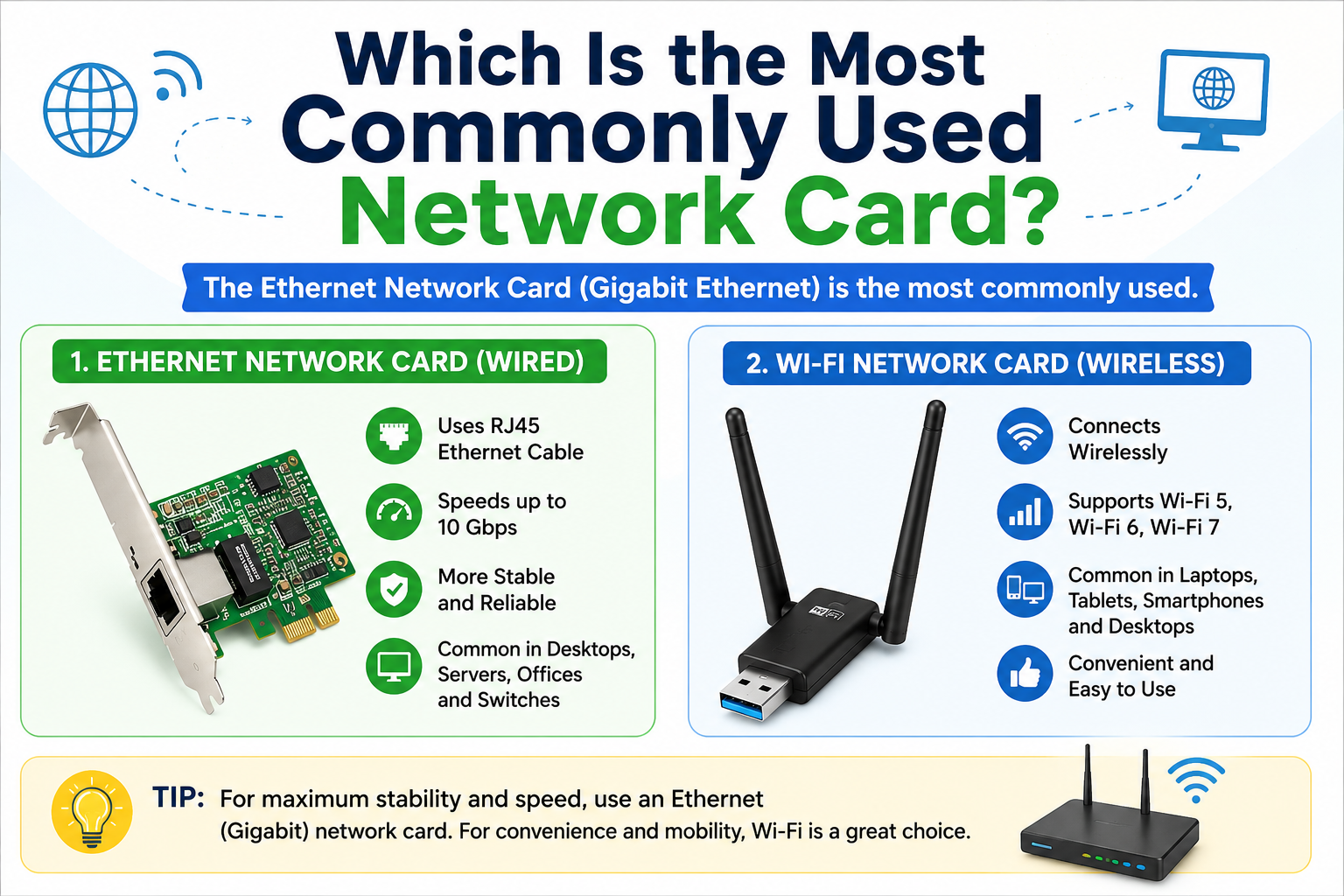
The Ethernet network card is one of the most commonly used types of network cards, especially on desktop computers, servers, office computers, and other wired network devices.
Ethernet network cards use a network cable, usually an RJ45 Ethernet cable, to connect a computer to a router, switch, or other network device.
Common Ethernet speeds include:
- 10 Mbps
- 100 Mbps
- 1 Gbps
- 2.5 Gbps
- 10 Gbps
Today, Gigabit Ethernet (1 Gbps) is very common because it provides good speed, stability, and low cost.
Ethernet vs Wi-Fi Network Cards
There are two common ways for a computer to connect to a network: Ethernet and Wi-Fi.
Ethernet NetworkCard
An Ethernet card uses a physical cable. It normally provides a stable and reliable connection.
It is commonly used in:
- Desktop PCs
- Servers
- Office networks
- Network switches
- Gaming PCs
- CCTV systems
- Internet service networks
Ethernet is a good choice when you need a fast and stable connection.
Wi-Fi Network Card
A Wi-Fi networkcard allows a computer to connect to a wireless network. It does not need an Ethernet cable between the computer and router.
Wi-Fi adapters are common in:
- Laptops
- Tablets
- Smartphones
- Desktop computers
- Smart devices
Modern Wi-Fi cards can support technologies such as Wi-Fi 5, Wi-Fi 6, and Wi-Fi 7.
Why Is Ethernet So Popular?
Ethernet has been popular for many years because it is simple, reliable, and affordable.
One major advantage is stability. A wired Ethernet connection is usually less affected by walls, distance, and wireless interference than Wi-Fi.
Ethernet also offers low latency, which makes it useful for gaming, video calls, servers, and business networks.
For example, if a computer has a Gigabit Ethernet card and the network supports 1 Gbps, it can provide a very fast local network connection.
What Is a Gigabit Network Card?
A Gigabit networkcard can support network speeds of up to 1 Gbps, or 1,000 Mbps, under suitable network conditions.
Many modern computers come with built-in Gigabit Ethernet. This is one reason Gigabit Ethernet cards are so widely used.
For normal home internet, office work, streaming, file sharing, and many other tasks, a Gigabit networkcard is more than enough.
Do Laptops Have Network Cards?
Yes. Laptops normally have a built-in Wi-Fi network adapter.
Some laptops also include an Ethernet port. However, many thin and modern laptops do not have a built-in Ethernet port.
If a laptop does not have an Ethernet port, you can use a USB-to-Ethernet adapter. This allows the laptop to connect to a wired network.
Do Desktop Computers Have Network Cards?
Most modern desktop computers have a network adapter built into the motherboard.
Many desktop PCs have both:
- Ethernet
- Wi-Fi
If the computer does not have the network connection you need, you can install a PCIe networkcard or use a USB network adapter.
Which Network Card Should You Choose?
The right network card depends on your needs.
For normal home and office use, a Gigabit Ethernet card is a good choice.
For a wireless computer, a modern Wi-Fi 6 or Wi-Fi 7 adapter can provide excellent wireless performance when the router also supports the same technology.
For servers and high-speed networks, you may need a 2.5 Gbps, 5 Gbps, 10 Gbps, or faster Ethernet card.
Final Thoughts
The Ethernet network card is one of the most commonly used network ard types, with Gigabit Ethernet being especially common in modern computers and networks.
Wi-Fi network cards are also extremely common, particularly in laptops and mobile devices. The best choice depends on how you use your computer.
If you want maximum stability and low latency, Ethernet is usually the better choice. If you want convenience and mobility, Wi-Fi is a great option.
Before buying a network card, check your computer, router, switch, cable, and internet speed. A faster network card cannot make the whole network faster if the other equipment does not support that speed.